Kev tshaj tawm
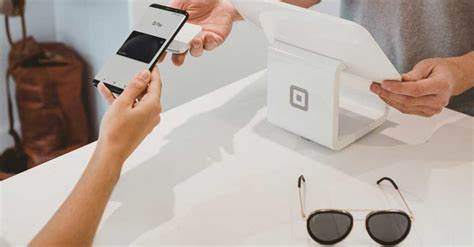
Txij li thaum tau qhia tawm, cov thev naus laus zis ntawm kev them nyiaj los ntawm kev kov thiab cov hnab nyiaj digital tau hloov pauv txoj kev uas peb ua cov kev sib pauv nyiaj txiag.
Apple Pay thiab Google Wallet yog ob qho piv txwv tseem ceeb ntawm cov kev tsim kho tshiab no, muab kev yooj yim thiab kev nyab xeeb rau cov neeg siv iPhone thiab Android.
Hauv zaj lus no, peb yuav tshawb xyuas seb cov platform no ua haujlwm li cas thiab seb lawv tab tom hloov pauv lub neej yav tom ntej ntawm kev them nyiaj li cas.
Apple Pay: Apple Kev Hloov Pauv hauv Kev Them Nyiaj
Apple Pay yog ib qho ntawm cov cuab yeej them nyiaj los ntawm kev kov tseem ceeb, tsim los ntawm lub tuam txhab thev naus laus zis loj Apple.
Los ntawm kev siv iPhone, Apple Watch lossis iPad, cov neeg siv tuaj yeem yuav khoom yam tsis tas yuav muaj daim npav lub cev.
Nrog kev nyab xeeb ua qhov tseem ceeb, Apple Pay siv cov thev naus laus zis xws li Touch ID, Face ID thiab kev txheeb xyuas kev them nyiaj uas siv token los tiv thaiv cov neeg siv cov ntaub ntawv nyiaj txiag.
Tsis tas li ntawd, txhua qhov kev sib pauv yuav tsum tau tso cai nrog tus lej tshwj xeeb, ntxiv ib txheej kev nyab xeeb ntxiv.
Google Wallet: Kev Them Nyiaj Ceev thiab Nyab Xeeb rau Cov Khoom Siv Android
Google Wallet, ntawm nws qhov, yog Google cov lus teb rau Apple Pay, muab ib qho kev daws teeb meem them nyiaj tsis tas kov rau cov cuab yeej Android.
Ib yam li Apple Pay, Google Wallet tso cai rau cov neeg siv khaws cov npav credit thiab debit hauv lawv cov xov tooj ntse thiab them nyiaj sai thiab nyab xeeb.
Ib qho ntawm Google Wallet cov txiaj ntsig tshwj xeeb yog nws kev sib txuas nrog Android ecosystem, muab kev paub siv du thiab sib haum xeeb rau cov neeg siv cov cuab yeej Android.
Tsis tas li ntawd, lub platform tseem muaj cov txiaj ntsig zog thiab cov kev pab cuam loyalty los txhawb kom siv txuas ntxiv.
hnab nyiaj digital: Kev cuam tshuam thiab yav tom ntej ntawm kev them nyiaj tsis tas kov
Kev tshwm sim ntawm Apple Pay thiab Google Wallet qhia txog kev hloov pauv loj hauv txoj kev peb tswj hwm nyiaj txiag.
Nrog rau kev siv cov thev naus laus zis no zuj zus, kev them nyiaj tsis tas kov tab tom dhau los ua ntau dua thoob plaws ntiaj teb.
Ntxiv rau qhov muab kev yooj yim rau cov neeg siv khoom, cov platform them nyiaj los ntawm kev chwv ze kuj muaj peev xwm txhawb kev koom nrog nyiaj txiag, ua rau cov neeg uas tsis muaj kev nkag mus rau cov kev pabcuam nyiaj txiag ib txwm muaj tuaj yeem koom nrog hauv kev lag luam digital.
Thaum peb mus tom ntej, tej zaum peb yuav pom kev sib koom ua ke ntau dua ntawm cov thev naus laus zis no hauv peb lub neej txhua hnub, nrog ntau lub cuab yeej thiab tshuab siv kev them nyiaj los ntawm kev chwv ze ua tus qauv.
Txawm li cas los xij, nws yog ib qho tseem ceeb uas cov neeg tsim kho thiab cov tswj hwm txuas ntxiv txhim kho cov kev ntsuas kev nyab xeeb thiab kev ceev ntiag tug kom tiv thaiv cov neeg siv tawm tsam cov kev hem thawj hauv cyber uas yuav tshwm sim.
Cov Hnab Nyiaj Digital thiab Kev Hloov Pauv hauv Kev Lag Luam Nyiaj Txiag
Hauv lub ntiaj teb uas niaj hnub hloov mus ua digital ntau dua, Apple Pay thiab Google Wallet sawv cev rau kev hloov pauv tseem ceeb hauv txoj kev peb ua cov kev lag luam nyiaj txiag.
Los ntawm kev sib txuas ua ke ntawm kev yooj yim, kev nyab xeeb thiab kev tsim kho tshiab, cov platform no tab tom ua kom cov txheej txheem them nyiaj los ntawm kev chwv ze yooj yim dua thiab tab tom tsim lub neej yav tom ntej ntawm cov kev pabcuam nyiaj txiag.
Duab: Luam tawm dua/ Is Taws Nem.